Best Budget Gaming Monitor 2026: Top Picks Under $300
High refresh rate gaming without breaking the bank
Recommended Products
Based on our research, here are some top picks:
LG 32G620B-B UltraGear Gaming Monitor -

under $500 on Amazon
ASUS ROG Swift OLED PG27AQDP 27" Gaming Monitor -

under $750 on Amazon
Samsung Odyssey G55C Gaming Monitor -

under $500 on Amazon
Dell UltraSharp U2723QE 4K Monitor -

under $750 on Amazon
As an Amazon Associate, we earn from qualifying purchases.
Quick Navigation
Quick Picks by Budget
The bottom line: You don't need to spend $500+ for great gaming. Budget monitors in 2026 offer excellent performance - 144Hz+ is standard even under $150. Focus on reputable brands and the right specs for your GPU.
Best Gaming Monitors Under $150
At this price, expect solid 1080p 144Hz+ performance. You'll sacrifice adjustable stands and premium features, but gaming performance is excellent.
AOC 24G42HE

under $100 on Amazon
Resolution: 1920x1080
Refresh Rate: 200Hz
Panel: IPS, 1ms
Size: 24 inches
Adaptive Sync: Console Gaming Ready
Price: Under $100
The AOC 24G42HE is the budget king. IPS colors at this price are rare, and 200Hz exceeds what most budget GPUs can push. The 3-sided frameless design looks modern, and AOC's 3-year zero-bright-dot warranty backs it up. Value is unbeatable.
Check Price on AmazonSceptre E255B-1658A
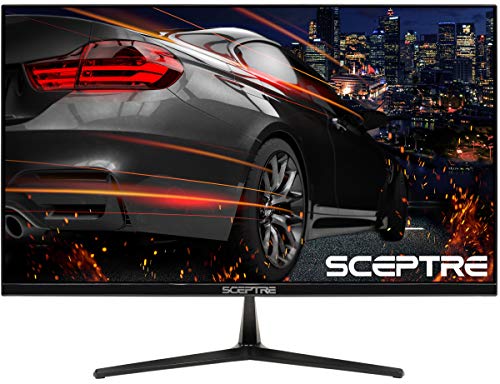
under $100 on Amazon
Resolution: 1920x1080
Refresh Rate: 165Hz
Panel: 1ms, 106% sRGB
Size: 25 inches
Built-in Speakers: Yes
Price: $182
Sceptre offers great specs at aggressive pricing. The 25" size is slightly larger than standard. FreeSync Premium and built-in speakers save desk space. Good choice if AOC is unavailable.
Check Price on AmazonASUS TUF VG247Q1A

under $250 on Amazon
Resolution: 1920x1080
Refresh Rate: 165Hz
Panel: TN, 0.5ms
Size: 24 inches
Features: G-Sync Compatible, Eye Care
Price: Under $250
TN panel means worse colors and viewing angles, but the fastest response times in the budget category. The 1ms (MPRT) response and 165Hz make it a favorite for competitive play. G-Sync Compatible and a height-adjustable stand round it out.
Check Price on AmazonBest Gaming Monitors Under $200
The sweet spot for budget gaming. Expect quality IPS panels, better stands, and some premium features.
LG 24G411A-B

under $250 on Amazon
Resolution: 1920x1080
Refresh Rate: 180Hz
Panel: IPS, 1ms GtG
Size: 24 inches
Stand: Height, Tilt, Pivot
Price: $194
LG's UltraGear gaming pedigree shows here. Excellent IPS panel, 180Hz refresh, and a fully adjustable Tilt/Height/Pivot stand that is rare under $200. NVIDIA G-Sync Compatible with HDR10 support. The best overall choice in this bracket.
Check Price on AmazonASUS VG27AQ1A

under $250 on Amazon
Resolution: 2560x1440
Refresh Rate: 170Hz
Panel: IPS, 1ms MPRT
Size: 27 inches
Features: ELMB, G-Sync Compatible
Price: Under $250
A 27" QHD IPS panel that punches above its price. ELMB allows motion blur reduction, and 170Hz over QHD looks sharp and smooth. G-Sync Compatible with great input lag. Slightly over $200 but well worth it for the resolution jump.
Check Price on AmazonMSI MAG 274CF X24

under $250 on Amazon
Resolution: 1920x1080
Refresh Rate: 240Hz
Panel: 0.5ms, HDR Ready
Size: 27 inches
Adaptive Sync: FreeSync Premium
Price: Under $250
MSI's MAG 274CF X24 delivers a blistering 240Hz at 27" for well under $200, making it a steal for competitive gaming. FreeSync Premium keeps frames tear-free and the 0.5ms response is razor fast. Solid all-around performer.
Check Price on AmazonBest Gaming Monitors Under $300
At this price, 1440p becomes viable. You're getting near mid-range quality with excellent gaming performance.
Gigabyte M27Q2

under $250 on Amazon
Resolution: 2560x1440
Refresh Rate: 200Hz
Panel: SS IPS, 1ms
Size: 27 inches
Features: Type-C KVM Switch
Price: Under $250
The best value 1440p gaming monitor. The updated M27Q2 bumps refresh to 200Hz and keeps the built-in Type-C KVM switch for multi-device setups. Wide color coverage rivals monitors twice the price. A no-brainer at this price.
Check Price on AmazonDell S2725DSM

under $250 on Amazon
Resolution: 2560x1440
Refresh Rate: 144Hz
Panel: 1ms, QHD
Size: 27 inches
Brand: Dell support
Price: Under $250
Dell's current S2725DSM is a strong QHD value pick with 144Hz and crisp 1440p clarity at 27". Solid colors out of the box and the reliability of Dell quality and support. A safe, well-rounded 1440p choice under $200.
Check Price on AmazonPixio PX277 Prime

under $250 on Amazon
Resolution: 2560x1440
Refresh Rate: 200Hz
Panel: Fast IPS, 1ms GtG
Size: 27 inches
Adaptive Sync: Adaptive Sync
Price: Under $250
Pixio specializes in value gaming monitors. The current PX277 Prime Neo V2 bumps the 1440p Fast IPS panel to 200Hz and adds a fully adjustable stand. Great color accuracy out of the box. The brand is less known but quality is solid.
Check Price on AmazonAOC 27G4H

under $250 on Amazon
Resolution: 1920x1080
Refresh Rate: 200Hz
Panel: IPS, 0.3ms MPRT
Size: 27 inches
Features: Height Adjust, G-Sync Compatible
Price: Under $250
If your GPU can't handle 1440p, get a fast 1080p monitor instead. The AOC 27G4H offers a 200Hz IPS panel, G-Sync Compatible support, and a fully adjustable stand for under $250. Better to have 1080p at high FPS than 1440p at low FPS.
Check Price on AmazonWhat to Prioritize on a Budget
1. Refresh Rate (144Hz+)
The biggest upgrade over 60Hz. 144Hz should be your minimum. The difference is immediately noticeable. Don't sacrifice this for other features.
2. Panel Type (IPS preferred)
IPS offers better colors and viewing angles than TN. VA is also good (better contrast). Budget IPS panels have gotten excellent - no longer a premium-only feature.
3. Response Time (<5ms GtG)
Most gaming monitors achieve this. Avoid panels with 8ms+ response times. Don't trust marketing "1ms" claims - check reviews for real-world performance.
4. Adaptive Sync (FreeSync)
FreeSync is free to implement - almost all budget monitors include it. Works with both AMD and NVIDIA GPUs. Eliminates tearing when FPS fluctuates.
What to Skip on a Budget
HDR (at this price)
Budget "HDR" monitors (HDR400) aren't bright enough for real HDR. It's a checkbox feature. Don't pay extra for it - save for a proper HDR monitor later.
RGB Lighting
Monitor RGB adds $20-50 to the price for a feature you'll rarely see (it's behind the monitor). Skip it and get better core specs instead.
Fancy Stands
Height adjustment is nice but not essential. Tilt-only stands work fine - use a book or monitor arm later if needed. Don't pay $50 extra for stand features.
Built-in Speakers (usually)
Monitor speakers are almost always bad. You're better off with $20 desktop speakers or headphones. Exception: if you have zero audio setup, convenience matters.
GPU Pairing Guide
Match your monitor to your GPU capabilities. A 1440p 165Hz monitor is wasted on a GTX 1650.
Recommended Monitor by GPU
| Your GPU | Recommended Monitor | Expected Performance |
|---|---|---|
| GTX 1650 / RX 5500 XT | 1080p 144Hz | 60-100fps high settings |
| GTX 1660 / RX 5600 XT | 1080p 144Hz | 100-144fps high settings |
| RTX 3060 / RX 6600 | 1080p 165Hz or 1440p 144Hz | 1080p: 144fps+ / 1440p: 60-100fps |
| RTX 3070 / RX 6700 XT | 1440p 144Hz+ | 100-144fps high settings |
| RTX 4070 / RX 7800 XT | 1440p 165Hz+ | 144fps+ high/ultra settings |
Frequently Asked Questions
What is a good budget for a gaming monitor?
$150-200 gets you solid 1080p 144Hz. $200-300 opens up 1440p options. The sweet spot for most budget gamers is $150-250 - you get excellent gaming performance without overpaying for features you don't need.
Is 144Hz worth it on a budget monitor?
Absolutely. 144Hz is the single biggest upgrade over 60Hz and many budget monitors now include it. The smoothness difference is immediately noticeable. Prioritize 144Hz over other features.
Should I get 1080p or 1440p on a budget?
Under $200: stick with 1080p for better panels and higher refresh rates. At $200-300: 1440p becomes viable. Also match to your GPU - 1440p 144Hz needs at least an RTX 3060 or equivalent.
What's the best budget gaming monitor brand?
AOC, Pixio, and Sceptre offer excellent budget options. ASUS, MSI, and Gigabyte have good entry-level gaming lines too. Avoid unknown Amazon brands - poor quality control and fake specs are common.
Are cheap gaming monitors worth it?
Budget monitors from reputable brands are absolutely worth it. You sacrifice premium features like USB hubs or HDR, but core gaming performance (refresh rate, response time, input lag) can be excellent.
Related Guides
Not Sure Which Monitor Is Right for You?
Take our quick quiz and get a personalized recommendation in under 2 minutes.