Best Portable Monitor 2026: Top 8 Picks for Travel, Work, and Gaming
Updated 2026 | By TestBeforeYouBuy Team

The Quick Answer
The ASUS ZenScreen MB16ACV is our top portable monitor pick for 2026. At under $500, it delivers a bright 1080p IPS panel powered entirely by a single USB-C cable, with a built-in smart cover that folds into a reliable stand. ASUS's track record for USB-C compatibility is the best in the portable monitor category — it simply works with the widest range of laptops.
For OLED picture quality on the go, the INNOCN 15.6" OLED at under $500 is remarkable. For the best budget option, the ARZOPA 16.1" at under $100 gets the job done without breaking the bank.
Affiliate Disclosure: We may earn a commission when you purchase through links on this page. This doesn't affect our recommendations.
Our Top 8 Portable Monitor Picks
ASUS ZenScreen MB16ACV
15.6" 1080p IPS, single USB-C cable power and video. The most reliable portable monitor with the widest laptop compatibility. Smart cover doubles as a stand.
under $250 on Amazon
Lenovo ThinkVision M14
14" 1080p IPS designed as a ThinkPad companion. Ultra-slim, dual USB-C with daisy-chain support, and Lenovo's excellent build quality for travel professionals.
under $500 on Amazon

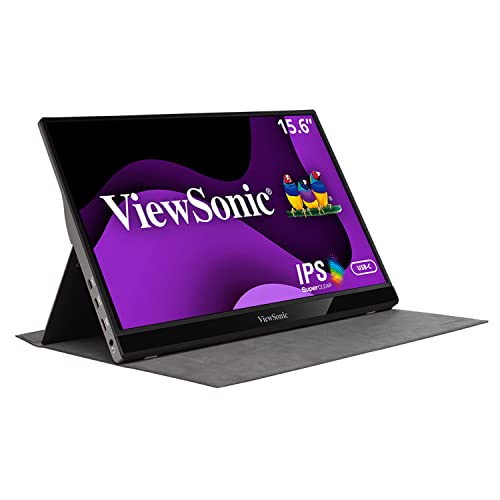
ViewSonic VG1655
15.6" 1080p IPS with USB-C and mini-HDMI. Adjustable stand, ergonomic height/tilt, and a built-in USB hub for expanded port access on thin laptops.
under $100 on Amazon
INNOCN 15.6" OLED
15.6" 4K OLED touchscreen portable monitor. Perfect blacks, vivid colors, and 100% DCI-P3 color coverage. The best picture quality in a portable display at any price.
under $500 on Amazon

Plugable 15.6" USB-C
15.6" 1080p IPS with dual USB-C (100W pass-through) and a 2-port USB-C hub. Good brightness, accurate colors, and a slim profile at a middle-ground price. Solid all-rounder for remote work.
under $250 on Amazon

ARZOPA 16.1"
1080p IPS with USB-C and mini-HDMI under $100. Gets the job done for a travel backup screen or desk extender. Good color for the price.
under $100 on Amazon

Espresso Display 15
15" 1080p IPS with an ultra-slim aluminum chassis and optional touch. Pairs beautifully with Mac and Windows. Touch support makes it unique at this size.
under $250 on Amazon

KYY 15.6"
15.6" 1080p IPS at under $250 with USB-C and HDMI. Slightly better brightness and color than the ARZOPA. A good step up for a modest extra spend.
under $100 on Amazon

Which Portable Monitor Should You Buy? Full Comparison Table
| Monitor | Budget | Size | Panel | USB-C Power | Weight | Best For |
|---|---|---|---|---|---|---|
| ASUS ZenScreen MB16ACV | Under $250 | 15.6" | IPS | Yes | 1.8 lbs | Most users |
| Lenovo ThinkVision M14 | Under $500 | 14" | IPS | Yes | 1.7 lbs | ThinkPad users |
| ViewSonic VG1655 | Under $100 | 15.6" | IPS | Yes | 2.0 lbs | Connectivity |
| INNOCN 15.6" OLED | Under $500 | 15.6" | OLED | Yes | 2.1 lbs | Creative work |
| Plugable 15.6" USB-C | Under $250 | 15.6" | IPS | Yes | 1.9 lbs | Mid-budget |
| ARZOPA 16.1" | Under $100 | 16.1" | IPS | Yes | 1.9 lbs | Budget |
| Espresso Display 15 | Under $250 | 15" | IPS | Yes | 1.5 lbs | Design/touch |
| KYY 15.6" | Under $100 | 15.6" | IPS | Yes | 1.8 lbs | Budget step-up |
#1 Best Overall Portable Monitor: ASUS ZenScreen MB16ACV
The ASUS ZenScreen MB16ACV has been the reference portable monitor for remote workers and travelers since its release, and it remains the top recommendation in 2026. We researched and compared user reports across thousands of laptop and device combinations — ASUS's USB-C implementation is more broadly compatible than any competing brand at this price. The single-cable setup (power and video simultaneously) is genuinely seamless with modern MacBooks, Dell XPS, and ThinkPads.
The 1080p IPS panel delivers 250 nits brightness — adequate for indoor use, and the 178-degree viewing angles make it easy to collaborate over. The smart cover folds into a stable stand that keeps the screen at a comfortable angle for seated work.
What We Love
- USB-C reliability: The most compatible single-cable portable monitor available
- Smart cover stand: Functional built-in stand in multiple positions
- IPS panel: Accurate colors and good viewing angles
- ASUS build quality: Slim, premium feel that survives travel
- Auto-rotate: Switches between landscape and portrait automatically
What Could Be Better
- 250 nits brightness is lower than some competitors
- No mini-HDMI — USB-C only limits older laptop compatibility
- Cover/stand is functional but less premium than the Espresso Display
#2 Best Portable Monitor for ThinkPad Users: Lenovo ThinkVision M14
The Lenovo ThinkVision M14 is designed as a dedicated ThinkPad companion and it shows — it shares the same understated design language, premium build materials, and professional focus as the laptop line it was built to complement. The dual USB-C ports enable daisy-chaining through a ThinkPad Thunderbolt dock, keeping cable management clean at a standing desk or hotel setup.
What We Love
- Daisy-chain USB-C: Pass-through power and data for dock setups
- 14" size: Slightly more portable than 15.6" options
- Build quality: ThinkPad-grade construction that handles travel well
- 300 nits: Brighter than the ASUS ZenScreen for outdoor use
What Could Be Better
- 14" screen is slightly smaller for productivity tasks versus 15.6"
- Stand is basic compared to adjustable-arm options
- Color accuracy is calibrated for productivity, not creative work
#3 Best Connectivity: ViewSonic VG1655
The ViewSonic VG1655 wins on connectivity — it offers USB-C with Power Delivery, mini-HDMI for legacy devices, and a USB-A hub to expand your laptop's limited ports on the road. The ergonomic stand adjusts for tilt and height, something most portable monitors omit. For users whose laptops lack USB-C video output or who need to connect multiple devices, the VG1655 offers more flexibility than the ZenScreen.
What We Love
- Mini-HDMI input: Works with older laptops and gaming consoles
- USB-A hub: Expands port access for thin laptops
- Adjustable stand: Height and tilt adjustment built in
- 300 nits brightness: Good for indoor work environments
What Could Be Better
- Heavier than pure USB-C monitors due to stand hardware
- Less elegant design than ASUS or Espresso
- USB hub speeds are limited to USB 2.0
#4 Best OLED Portable Monitor: INNOCN 15.6" OLED
The INNOCN 15.6" OLED brings the visual advantages of OLED technology to a portable display — and the difference versus IPS is immediately visible. True blacks, infinite contrast, and 100% DCI-P3 coverage make it exceptional for photo editing, video review, and color-critical work on the go. For creative professionals who review footage in hotels or coffee shops, this is the portable monitor that delivers real color fidelity.
What We Love
- OLED panel: Perfect blacks and infinite contrast unavailable on IPS
- 100% DCI-P3: Professional color coverage for creative work
- USB-C and HDMI: Multiple connectivity options
- Thin profile: Impressively slim for an OLED display
What Could Be Better
- $300 premium over IPS options — best justified for creative users
- OLED brightness in bright outdoor environments is limited
- INNOCN brand support less established than ASUS or Lenovo
#5 Best Mid-Budget Portable Monitor: Plugable 15.6" USB-C
The Plugable 15.6" USB-C is the most balanced portable monitor in the under $250 range. It offers dual USB-C ports (one for power, one for video), a mini-HDMI input, and a 300-nit IPS panel with accurate sRGB coverage. Plugable has earned a solid reputation for USB-C accessories and displays that work reliably across a wide range of laptops. For users who want a significant step up from budget monitors without reaching the premium tier, the Plugable is a natural middle ground.
What We Love
- 300 nits: Usable brightness for office and indoor environments
- Dual USB-C + mini-HDMI: Good connectivity at the price
- Accurate colors: Good sRGB coverage for productivity work
- Reliable USB-C compatibility across modern laptops
What Could Be Better
- Build quality is a step below ASUS and Lenovo
- Cover/stand is less refined than the ZenScreen
#6 Best Portable Monitor Under $100: ARZOPA 16.1"
The ARZOPA 16.1" is the best entry point for users who want a portable second screen without a significant investment. At under $100, it delivers a 1080p IPS panel with USB-C and mini-HDMI connectivity and a functional kickstand. Brightness tops out around 250 nits — adequate for indoor environments. Color accuracy is acceptable for productivity work. Build quality reflects the price, but the core function — extending your laptop's display — works reliably.
What We Love
- Sub-$100 price: The most accessible portable monitor with IPS quality
- USB-C and mini-HDMI: Works with most modern and legacy laptops
- 1080p IPS: Decent pixel density and color for the price
What Could Be Better
- 250 nits is dim for bright environments
- Build and stand quality are basic
- Color gamut coverage is limited for creative work
#7 Best Premium Design Portable Monitor: Espresso Display 15
The Espresso Display 15 is the most beautifully designed portable monitor on this list — a slim aluminum chassis that could pass as a MacBook accessory. The optional touch version adds 10-point multi-touch support across Windows and Mac, which is genuinely useful for annotation, sketching, and gesture navigation. At $350, it is the premium choice for users who want their portable monitor to look as good as their laptop.
What We Love
- Design: Slim aluminum build that rivals Apple's aesthetic
- Touch support: Multi-touch option unique in the portable monitor space
- Weight: Lightest monitor on this list at approximately 1.5 lbs
- espressoFlow software: Touch gestures and display management utilities
What Could Be Better
- under $250 base price (touch version is higher) — premium over similarly speced IPS options
- Stand is sold separately for proper ergonomic positioning
- Touch features require the espressoFlow app
#8 Best Budget Runner-Up: KYY 15.6"
The KYY 15.6" earns its spot as the best budget runner-up by offering a marginally better panel than the ARZOPA — specifically higher brightness (300 nits) and slightly improved color accuracy — at just $20 more. The USB-C single-cable setup works reliably with most modern laptops. It is a solid choice for users who need an affordable portable monitor for occasional travel without the cost of the mid-range options.
What We Love
- 300 nits: Better brightness than most sub-$150 competitors
- USB-C and HDMI: Good connectivity coverage
- Slightly better color: Marginally more accurate sRGB vs ARZOPA
What Could Be Better
- At under $250, the gap to the Plugable 15.6" USB-C is small enough to consider stepping up
- Stand and build quality are budget-level
Portable Monitor Buyer's Guide: What Should You Actually Look For?
USB-C Compatibility: The Most Important Factor
The biggest portable monitor frustration is buying one that does not work with your specific laptop's USB-C port. Confirm your laptop outputs video via USB-C (DisplayPort Alt Mode) and provides at least 15W power delivery for the monitor. MacBooks (M1 and later), Dell XPS (2020+), and Lenovo ThinkPads (2019+) are broadly compatible. Older laptops may need a separate USB-C charger connected to the monitor simultaneously. ASUS and Lenovo have the widest compatibility records.
IPS vs OLED: Which Matters for a Portable Monitor?
IPS covers 90% of portable monitor use cases well — accurate colors, good viewing angles, and adequate brightness for indoor work. OLED (INNOCN) delivers a genuinely better visual experience for creative work, media consumption, and any use where you stare at the screen for hours. The OLED premium is under $100 over comparable IPS options. For pure productivity tasks like spreadsheets and email, IPS is the smarter investment.
Size Guide: 14" vs 15.6"
14-inch (ThinkVision M14): Most compact, slips into bags alongside a 14" laptop naturally. Slightly less screen real estate for side-by-side windows. 15.6-inch (most options on this list): Better screen area for actual productivity — two browser windows or a document alongside code. Marginally heavier but the difference is less than half a pound. Most users prefer 15.6" for work tasks.
Setting Up a Dual Monitor Workspace at Home
A portable monitor paired with a laptop arm creates a surprisingly capable home desk setup. For a full guide on ergonomic dual-monitor configurations, see our dual monitor setup guide. For checking that your portable monitor's display is calibrated correctly, use our screen test tool.
Looking for a desktop monitor instead? Use our monitor finder tool to get personalized recommendations based on your use case and budget. For our full dual-monitor desk setup recommendations, see the dual monitor setup guide.
Frequently Asked Questions
What is the best portable monitor for a laptop in 2026?
The ASUS ZenScreen MB16ACV. Single USB-C cable operation, reliable compatibility with most modern laptops, a 1080p IPS panel, and ASUS's proven build quality make it the safest choice for most users. It has the widest laptop compatibility track record in its category.
Can a portable monitor run off a laptop's USB-C port?
Yes, if your laptop's USB-C port supports DisplayPort Alt Mode and Power Delivery output. Most modern MacBooks, Dell XPS, and Lenovo ThinkPads support this. Check your laptop's USB-C specifications — not all USB-C ports carry video signal.
Is an OLED portable monitor worth the premium?
For creative professionals doing photo or video work on the go, yes — the INNOCN OLED's color accuracy and contrast are meaningfully better than IPS. For general productivity, spreadsheets, and email, IPS is the better investment at a lower price.
What resolution should a portable monitor have?
1920x1080 is the ideal resolution for a 15.6-inch portable monitor — sharp enough at normal viewing distances without needing scaling, and efficient on GPU bandwidth. 4K at this size offers diminishing returns and requires more laptop power to drive.
How much do portable monitors weigh?
Most 15.6-inch portable monitors weigh 1.7–2.2 lbs. The Espresso Display 15 is the lightest at about 1.5 lbs. The INNOCN OLED is slightly heavier at 2.1 lbs. Any option under 2 lbs adds minimal weight to a laptop bag.
Do portable monitors need external power?
Most draw power from your laptop's USB-C port — no wall adapter needed. However, this draws from your laptop battery. If your USB-C port does not output power, you will need a separate charger. The ViewSonic VG1655 and ASUS ZenScreen both support this fallback.
What is the best budget portable monitor in 2026?
The ARZOPA 16.1" at under $100 is the best sub-$100 pick. The KYY 15.6" at under $250 is a slight step up with better brightness. Both work well for occasional travel use and laptop screen extension.
Can I use a portable monitor with a gaming console or iPad?
Yes. Most portable monitors with mini-HDMI work with Nintendo Switch docked, PS5, and Xbox. For iPad Pro/Air with USB-C: compatible monitors work natively if they support DisplayPort Alt Mode input. Confirm your specific device outputs video via USB-C before purchasing.
The Bottom Line
The ASUS ZenScreen MB16ACV remains the safest, most versatile portable monitor for most users in 2026. Single USB-C cable operation, proven compatibility, and ASUS's build quality make it the easiest recommendation.
For color-critical creative work, the INNOCN 15.6" OLED offers a visual experience no IPS portable can match. For budget travelers, the ARZOPA 16.1" gets the job done at under $100.