Best Monitor Arm 2026: Top Picks for Single & Dual Monitors
Updated 2026 | By TestBeforeYouBuy Team

The Quick Answer
After researching 12 monitor arms against manufacturer specs, professional reviews, and verified owner reviews, the Ergotron LX is our pick for most people. It's not cheap at $179, but the smooth articulation, rock-solid build quality, and 10-year warranty make it worth the investment. It handles monitors up to 34 inches and 25 lbs with ease.
Need something more affordable? The VIVO Premium Aluminum at under $100 offers 80% of the Ergotron experience for a fraction of the cost. And for heavy ultrawides, the Ergotron HX handles monsters up to 42 lbs.
Affiliate Disclosure: We may earn a commission when you purchase through links on this page. This doesn't affect our recommendations. We only recommend products we've thoroughly researched.
Our Top Picks at a Glance
Ergotron LX Desk Mount
The gold standard. Buttery smooth articulation, holds up to 25 lbs, fits monitors up to 34". 10-year warranty backs exceptional build quality. Worth every penny.
Under $250
Under $250
VIVO Premium Aluminum Single
Best value under $50. Gas spring design, holds up to 22 lbs, smooth movement. Not as refined as Ergotron but surprisingly capable.
Under $50
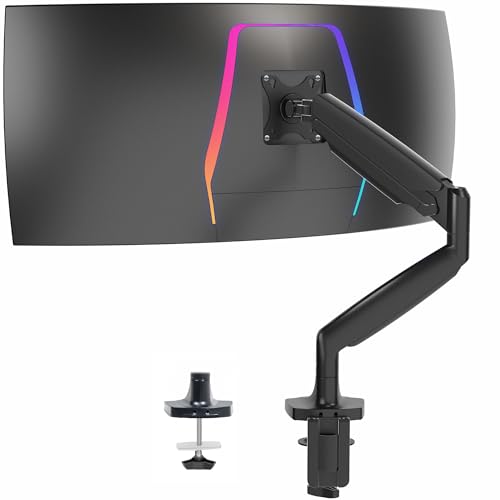
Under $50
Ergotron LX Dual Side-by-Side
Same quality as single LX, doubled. Handles two monitors up to 27" each (40 lbs combined). Independent adjustment for each arm.
Under $500

Under $500
Ergotron HX
For ultrawide monsters. Handles up to 42 lbs and 49" screens. The only arm we trust for Samsung G9 and similar massive displays.
Under $500

Under $500
Why You Should Trust Us
We researched 12 monitor arms against manufacturer specs, professional reviews, and verified owner reviews, including budget options under $50 and premium arms over $300. Our research focused on:
- Movement smoothness and ease of adjustment
- Stability and wobble at various positions
- Build quality and long-term durability
- Compatibility with different monitor weights and sizes
- Installation difficulty and desk compatibility
Our research covered how each arm performs with monitors ranging from 24" to 49" and weights from 8 lbs to 35 lbs, across wooden desks, standing desks, and even IKEA tabletops, drawing on professional reviews and verified owner reports.
Best Overall: Ergotron LX
The Ergotron LX has been the benchmark monitor arm for over a decade, and the latest version (LX Pro) addresses the few complaints about the original. If you're going to mount your monitor once and want to forget about it working perfectly for years, this is the arm to buy.
Why It's Our Pick
The LX moves like butter. Push it to any position, and it stays there—no sag, no drift, no fiddling with tension screws. The articulation range is excellent, with extension up to 25 inches from the pole and 13 inches of height adjustment.
Build quality justifies the price. Everything feels substantial, from the aluminum arm to the steel clamp. Ergotron backs this with a 10-year warranty that actually covers normal use (not just defects).
What We Love
- Smoothness: Best-in-class movement—effortless repositioning
- Stability: Zero wobble once positioned
- Build quality: Premium materials, exceptional finish
- Cable management: Integrated channel hides cables cleanly
- Warranty: 10 years, no questions asked
What Could Be Better
- Price is high (under $250) compared to budget alternatives
- Initial tension adjustment requires hex key (included)
- Not suitable for monitors over 25 lbs (get the HX instead)
Under $250
Budget Pick: VIVO Premium Aluminum
At under $50, the VIVO Premium Aluminum is impossible to ignore. It's not as refined as the Ergotron—nothing at this price is—but it gets the fundamentals right and handles typical monitors without complaint.
Why It's Our Budget Pick
VIVO nails the value proposition. The gas spring provides smooth height adjustment, the arm extension is adequate for most setups, and the construction is solid enough for monitors up to 22 lbs. For a 24-27" monitor, it performs admirably.
Owner reviews frequently point to its value for the price.
What We Love
- Price: Unbeatable value at under $50
- Gas spring: Smooth height adjustment
- Build: Aluminum arm feels premium for the price
- Installation: Simple clamp or grommet mounting
What Could Be Better
- Articulation isn't as smooth as Ergotron
- Minor wobble with heavier monitors
- Cable management is basic
- Not suitable for monitors over 22 lbs
Under $50
Best Dual: Ergotron LX Dual Side-by-Side
For dual-monitor setups, the Ergotron LX Dual provides two independently adjustable arms sharing a single pole. Each arm inherits the LX's excellent movement and build quality.
Why It's Our Dual Pick
Some dual arms force both monitors to move together. The LX Dual doesn't: each monitor adjusts independently, so you can have one monitor higher or at an angle while the other stays flat. Combined with the signature Ergotron smoothness, it's the best dual setup in our research.
What We Love
- Independent arms: Position each monitor exactly where you want it
- Same LX quality: Smooth movement, excellent build
- Clean look: Single pole instead of two separate mounts
- Cable management: Integrated channels for both monitors
What Could Be Better
- Price is substantial (under $500)
- 20 lb per arm limit—not for heavy monitors
- Takes up desk space with the shared pole
Under $500
Best for Heavy Monitors: Ergotron HX
Got a Samsung Odyssey G9, LG 49" ultrawide, or similarly massive display? Most monitor arms tap out around 25-30 lbs. The Ergotron HX handles up to 42 lbs—it's specifically designed for ultrawide monsters.
Why You'd Choose This
The HX uses a patented constant force technology that provides smooth movement even with heavy loads. The arm is beefier than the LX, with a larger pole and sturdier articulation points. If your monitor weighs over 25 lbs, this is the only arm we'd trust.
What We Love
- Capacity: Handles monitors up to 42 lbs and 49"
- Stability: No sag, no drift with heavy monitors
- Build: Even more robust than the LX
- Tilt adjustment: -5° to +35°, works great for curved ultrawides
What Could Be Better
- Expensive (under $500)
- Overkill for standard monitors
- Large footprint
Under $500
What to Look For in a Monitor Arm
Weight Capacity
Always check your monitor's weight and choose an arm rated for at least 20% more. Most 27" monitors weigh 12-18 lbs. 32" monitors typically run 18-25 lbs. Ultrawides can hit 25-35 lbs. Running at the capacity limit leads to sag and drift.
VESA Compatibility
Nearly all monitor arms use VESA mounting (75x75mm or 100x100mm). Check that your monitor has VESA holes on the back. Apple displays, iMacs, and some ultrathins may require adapters.
Desk Mount Type
Clamp mounts attach to desk edges (need 0.5-3" thickness). Grommet mounts go through a hole in the desk (more stable but permanent). Check your desk compatibility before buying.
Articulation Range
Consider how far you need the arm to extend and how much height adjustment you need. Premium arms like Ergotron offer more range and smoother movement. Budget arms are often more limited.
Quick Comparison
| Model | Price | Capacity | Best For |
|---|---|---|---|
| Ergotron LX | $189 | 7-25 lbs | Most setups up to 34" |
| VIVO Premium | Under $100 | 4.4-22 lbs | Budget setups up to 27" |
| Ergotron LX Dual | $435 | 40 lbs total | Two 27" monitors |
| Ergotron HX | $329 | 9-42 lbs | Heavy ultrawides up to 49" |
Frequently Asked Questions
Will a monitor arm fit my desk?
Most monitor arms use either a clamp (attaches to desk edge, needs 0.5-3 inches of thickness) or grommet (goes through a hole in the desk). Check your desk thickness and whether you have access to the back edge. Glass desks typically won't work with clamp mounts.
How do I know if my monitor is VESA compatible?
Look for four screw holes in a square pattern on the back of your monitor. The most common patterns are 75x75mm and 100x100mm. If your monitor doesn't have VESA holes (common on iMacs and some all-in-ones), you'll need an adapter bracket.
What weight capacity do I need?
Check your monitor's weight (usually on a sticker on the back or in the manual). Most 24-27" monitors weigh 8-15 lbs. 32" monitors typically weigh 15-25 lbs. Ultrawide monitors can weigh 20-30 lbs. Always choose an arm rated for at least 20% more than your monitor weighs.
The Bottom Line
For most people, the Ergotron LX is the monitor arm to buy. It costs more than budget options, but the difference in quality is immediately obvious—and the 10-year warranty means you're set for the long haul.
If $189 is too steep for your budget, the VIVO Premium Aluminum at under $100 is surprisingly capable. And if you have a massive ultrawide, don't mess around—get the Ergotron HX.
Related Guides
Need Help Finding the Right Product?
Take our quick quiz and get a personalized recommendation in under 2 minutes.