Best USB Microphone 2026: Top 8 Picks for Streaming, Podcasting, and Calls
Updated 2026 | By TestBeforeYouBuy Team

The Quick Answer
The Blue Yeti is our top USB microphone pick for 2026. At under $250, it delivers four selectable polar patterns, Blue VO!CE effects, zero-latency headphone monitoring, and a build quality that stands up to years of daily streaming. It is the most versatile USB microphone you can buy at this price and the default recommendation for most content creators.
For streamers who prefer Elgato's ecosystem and want anti-clip protection, the Elgato Wave:3 at under $250 is the premium alternative. For the best budget USB mic, the Fifine K669B at under $50 is the best-value entry point available.
Affiliate Disclosure: We may earn a commission when you purchase through links on this page. This doesn't affect our recommendations.
Our Top 8 USB Microphone Picks
Blue Yeti
Under $250
under $250 on Amazon
4 polar patterns, zero-latency monitoring, Blue VO!CE effects, studio-quality condenser capsules. The most versatile USB mic at this price, the default choice for streamers, podcasters, and creators.
Check Price on AmazonElgato Wave:3
Under $250

under $250 on Amazon
Proprietary Clipguard anti-distortion system, Wave Link multi-source mixer, clean cardioid pickup pattern. Best for streamers already using Elgato hardware and software.
Check Price on AmazonHyperX QuadCast 2 S
Under $250

under $250 on Amazon
RGB lighting, 4 polar patterns, removable shock mount, and convenient tap-to-mute. The best-looking USB microphone for RGB gaming setups.
Check Price on AmazonRode NT-USB Mini
Under $250

under $250 on Amazon
Studio-condenser sound in an ultra-compact body. Integrated pop filter, zero-latency monitoring, and Rode's broadcast-quality capsule, ideal for vocals, podcasting, and voice-over work.
Check Price on AmazonAudio-Technica AT2020USB-X
Under $250
under $250 on Amazon
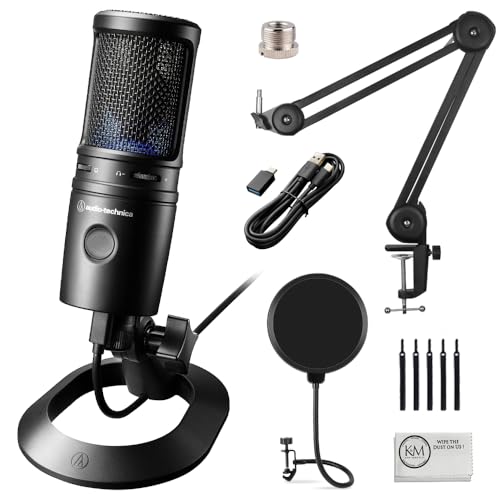
The USB version of one of the most beloved studio microphones ever made. Cardioid condenser with wide dynamic range, headphone monitoring, and the flat frequency response that audio engineers trust.
Check Price on AmazonSamson Q2U
Under $100

under $100 on Amazon
Dynamic microphone with both USB and XLR output. Start with USB, upgrade to XLR when you add an audio interface. The best starter microphone for podcasters planning to scale their setup.
Check Price on AmazonFifine K669B
Under $50

under $50 on Amazon
Cardioid condenser, plug-and-play, physical volume knob. The best USB microphone under $50, clean audio, zero-hassle setup, and a strong introduction to streaming-quality sound.
Check Price on AmazonBlue Snowball iCE
Under $50
under $50 on Amazon
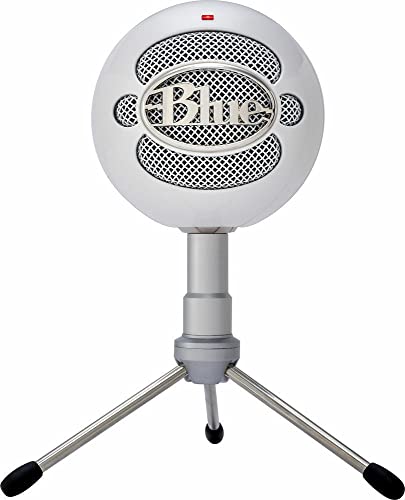
Cardioid condenser capsule, classic spherical design, USB plug-and-play. A significant sound quality upgrade from the Fifine at a still-affordable price, the most popular starter condenser mic ever made.
Check Price on AmazonWhich USB Microphone Should You Buy? Full Comparison Table
| Microphone | Budget | Type | Polar Patterns | Monitoring | Best For |
|---|---|---|---|---|---|
| Blue Yeti | Under $250 | Condenser | 4 | Yes | Best overall |
| Elgato Wave:3 | Under $250 | Condenser | Cardioid | Yes | Elgato ecosystem |
| HyperX QuadCast 2 S | Under $250 | Condenser | 4 | Yes | RGB setups |
| Rode NT-USB Mini | Under $250 | Condenser | Cardioid | Yes | Vocals/podcast |
| AT2020USB-X | Under $250 | Condenser | Cardioid | Yes | Studio quality |
| Samson Q2U | Under $100 | Dynamic | Cardioid | Yes | USB + XLR |
| Fifine K669B | Under $50 | Condenser | Cardioid | No | Budget |
| Blue Snowball iCE | Under $50 | Condenser | Cardioid | No | Budget step-up |
#1 Best Overall USB Microphone: Blue Yeti
under $250 on Amazon
The Blue Yeti is the USB microphone that professionals and serious hobbyists have trusted for years. Blue VO!CE effects give you broadcast-style EQ, compression, and noise reduction in software, and four condenser capsules arranged for the four polar patterns give this microphone a flexibility that most cardioid-only options simply cannot match.
Why Does the Blue Yeti Stand Above the Competition at under $250?
Three things set it apart: the multi-capsule array for four real polar patterns (not digital simulation), the on-board controls, and the Blue VO!CE software effects. You get a gain dial, a headphone volume knob, and a mute button on the body of the microphone. The zero-latency headphone monitoring lets you hear your own voice in real time, which is critical for confident, well-paced speaking during a stream or interview.
Audio quality in cardioid mode delivers a warm, detailed voice capture that holds up in post-processing for YouTube, Twitch, and podcast platforms. The frequency response is essentially flat between 20Hz-20kHz, which means the microphone captures your voice accurately rather than coloring it with artificial presence boosts. Blue VO!CE companion software (free) adds EQ, compression, and noise reduction for broadcast-ready audio without a separate audio interface.
What We Love
- 4 polar patterns: Cardioid, bidirectional, omnidirectional, and stereo
- LED level metering: Visual feedback prevents clipping in real time
- Physical controls: Gain, headphone volume, mute, and pattern selector on-body
- Zero-latency monitoring: Hear yourself as you sound to your audience
- Blue VO!CE software: Free DSP processing without an interface
- Build quality: Metal body with solid desk stand included
What Could Be Better
- Large form factor — requires a boom arm for optimal positioning
- Heavy for travel use
- No hardware anti-clip protection like Elgato's Clipguard
- No RGB lighting for gaming aesthetic setups
Pro tip: For the best results with the Blue Yeti, position it 6-8 inches from your mouth, angled slightly downward. Use cardioid mode for solo streaming. Enable the High Pass filter in Blue VO!CE if you hear room rumble. A cheap pop filter (Under $25) significantly reduces plosive sounds on P and B words.
#2 Best USB Mic for Elgato Ecosystem: Elgato Wave:3
under $250 on Amazon
The Elgato Wave:3 is built for streamers first. Its most distinctive feature is Clipguard — a dual-capsule system that continuously monitors a second capsule at lower gain. If your voice suddenly clips (a loud laugh, a shout during a game moment), Clipguard automatically blends in the lower-gain signal to prevent the distorted clip from reaching your stream. For live audio where you can't do retakes, this is genuinely valuable.
What We Love
- Clipguard: Prevents clipping even during sudden loud moments
- Wave Link software: Mix microphone, game, discord, and music into separate streams
- Capacitive mute button: Touch to mute, glows to confirm status
- Clean cardioid capsule: Excellent voice reproduction at the under $250 price
- Elgato ecosystem sync: Works natively with Stream Deck for one-touch audio control
What Could Be Better
- Cardioid only — no polar pattern flexibility
- More expensive than the Blue Yeti for less polar pattern versatility
- Wave Link software adds complexity for users who prefer simple setups
#3 Best RGB USB Microphone: HyperX QuadCast 2 S
under $250 on Amazon
The HyperX QuadCast 2 S is the Blue Yeti's most direct rival, same four polar patterns, similar audio quality, and a similar price, but with the addition of per-zone RGB lighting and USB-C, controlled through HyperX NGENUITY software. If your setup is RGB-coordinated, the QuadCast 2 S looks spectacular on camera and integrates smoothly with HyperX gear.
What We Love
- RGB lighting: Per-zone, software-controlled for ecosystem sync
- Removable shock mount: Integrated vibration isolation included in the box
- Tap-to-mute: Touch the top to instantly mute, LED confirms status
- 4 polar patterns: Same versatility as the Blue Yeti
What Could Be Better
- Slightly warmer frequency response than the Blue Yeti, may not suit all voices
- RGB control requires HyperX NGENUITY software
- Requires HyperX NGENUITY software for full RGB control
#4 Best USB Microphone for Vocals: Rode NT-USB Mini
under $250 on Amazon
The Rode NT-USB Mini is Rode's most compact USB condenser, and it delivers the smooth, broadcast-quality vocal capture that Rode is known for in the full NT-USB. The built-in pop filter eliminates the need for a separate accessory, and the integrated mount connects directly to standard mic arms. At around $103, it is the best pure-vocal USB microphone for podcasters and voice-over artists who don't need multi-pattern flexibility.
What We Love
- Broadcast capsule quality: Rode's vocal capture is among the best in USB format
- Integrated pop filter: One less accessory to buy and manage
- Ultra-compact: Barely larger than a travel canister
- Magnetic mounting: Clean, flexible desk mount system
What Could Be Better
- Cardioid only — no polar pattern options
- No gain knob on the body — requires software adjustment
- USB-C only — included cable is short
#5 Best Studio Sound USB Microphone: Audio-Technica AT2020USB-X
under $250 on Amazon
The Audio-Technica AT2020USB-X is the USB version of the AT2020, one of the most recommended studio microphones under $100 for over two decades. Audio-Technica's flat frequency response captures voice with minimal coloration — what you record is as close to reality as a condenser can get. For narration, voice-over, podcast, and any use where audio accuracy matters, the AT2020USB-X is the reference choice.
What We Love
- Flat frequency response: Accurate, uncolored vocal capture
- AT2020 capsule pedigree: Decades of proven studio recording quality
- USB-C connection: Modern connector on the updated X model
- Mix control: Blend microphone and computer audio through headphones
What Could Be Better
- Cardioid only — no multi-pattern flexibility
- Lacks the software ecosystem of Blue or Elgato
- No LED metering or visual feedback on levels
#6 Best USB/XLR Hybrid Microphone: Samson Q2U
under $100 on Amazon
The Samson Q2U is a dynamic microphone with both USB and XLR outputs — which means you can start streaming with the USB connection today and switch to an XLR audio interface setup later without buying a new microphone. Dynamic microphones are also naturally more resistant to room noise than condensers, making the Q2U a smart pick for untreated rooms where echo and background sounds are a concern.
What We Love
- USB + XLR dual output: Future-proof without paying for an interface now
- Dynamic capsule: More forgiving in noisy or reverberant rooms
- Best price among quality options: under $100 for both connection types
- Headphone monitoring: Zero-latency monitoring via the 3.5mm jack
What Could Be Better
- Dynamic mics require closer positioning than condensers (2-4 inches)
- Less detailed high-frequency response than condenser options
- No software ecosystem
#7 Best Budget USB Microphone: Fifine K669B
under $50 on Amazon
The Fifine K669B is the entry point that surprises everyone. At under $50 it competes against other budget options that look similar but sound noticeably worse. The cardioid condenser capsule delivers clean, clear voice capture, and the physical volume knob on the body is a detail usually absent at this price. For Discord, first-time streaming, or testing whether a better microphone will improve your content, the K669B is the lowest-risk purchase on this list.
What We Love
- Under $50 price point: The lowest-risk USB microphone upgrade
- Physical volume knob: Unusual convenience at this price
- Plug-and-play: No driver installation required
- Clean cardioid capture: Noticeably better than a laptop mic or gaming headset
What Could Be Better
- Audio quality gap versus $100+ options is audible
- No headphone monitoring
- Plastic build feels inexpensive
#8 Best Budget Step-Up USB Microphone: Blue Snowball iCE
under $50 on Amazon
The Blue Snowball iCE is the most recognizable budget microphone in streaming culture. At under $50, it delivers a meaningful step up from the Fifine's audio quality with Blue's custom cardioid condenser capsule. The classic spherical design is polarizing — some love the distinctive look on camera, others find it takes up too much desk space. It is a common first step up from a headset mic.
What We Love
- Better condenser capsule than K669B: Audible improvement in voice clarity
- Plug-and-play: No software required
- Distinctive design: Recognizable and iconic look for streaming setups
- Blue brand confidence: Established brand with good support and documentation
What Could Be Better
- No headphone monitoring
- Large spherical form factor can obstruct camera view
- Stand is fixed — requires a boom arm adapter for proper positioning
USB Microphone Buyer's Guide for Streamers
Condenser vs Dynamic: Which USB Mic Type Is Right for You?
Condenser microphones (Blue Yeti, Wave:3, NT-USB Mini, AT2020USB-X) are more sensitive — they capture more detail, presence, and clarity. They're ideal for treated rooms or environments with minimal background noise. Dynamic microphones (Samson Q2U) have a tighter pickup pattern and are less sensitive — they naturally reject more room noise, making them better for untreated spaces, loud environments, or shared rooms. Most streamers with a typical home office use a condenser.
How to Set Up Your USB Microphone for the Best Sound
Position the microphone 6-12 inches from your mouth in cardioid mode. Speak to the front (or top, for side-address designs) of the capsule. Keep the mic off the desk surface to avoid vibration noise — a boom arm is strongly recommended. Use a pop filter for P and B plosive sounds. Enable a noise gate in OBS at -30dB to -40dB threshold to silence background noise during pauses. These setup steps make more difference to audio quality than the microphone itself.
Do You Need Audio Test Tools?
Before and after setting up a new microphone, use our audio test tool to check levels, frequency response, and background noise. It takes 30 seconds and identifies if your gain is set too hot (causing distortion) or too low (forcing listeners to max their volume). A correct gain setting alone can transform a mediocre-sounding setup.
A USB microphone is one component of a complete streaming setup. See our best streaming setup 2026 guide for camera, capture card, and audio interface recommendations. For microphone-specific comparisons, our best microphone for streaming guide covers XLR options alongside USB. Use our audio test tool to verify your mic levels before going live.
Frequently Asked Questions
What is the best USB microphone for streaming in 2026?
Blue Yeti for most streamers, four polar patterns, Blue VO!CE effects, and on-board controls for under $250. Elgato Wave:3 for Elgato ecosystem users who want Clipguard anti-clip protection. Fifine K669B for budget-conscious first-time streamers at under $50.
Is USB or XLR microphone better for streaming?
USB is the right choice for most streamers. No interface required, simpler setup, and modern USB mics like the Blue Yeti produce audio quality that streaming platforms and most audiences cannot distinguish from XLR setups. XLR makes sense when you already own an interface or are building a dedicated recording studio.
What polar pattern should I use for streaming?
Cardioid for virtually all solo streaming and podcasting. Cardioid picks up sound from in front while rejecting side and rear noise — keyboards, fans, and room echo. Omnidirectional only for multi-person roundtable recording. When in doubt, use cardioid.
Do I need a microphone arm for a USB microphone?
Strongly recommended. A boom arm positions the mic correctly, reduces desk vibration pickup, and frees up desk space. Budget arms under $25 work adequately. Better options include the Elgato Wave Mic Arm (under $100) or RODE PSA1 (under $250) for smooth, broadcast-style adjustment.
What is the best budget USB microphone?
Fifine K669B at under $50 for the absolute lowest price. Blue Snowball iCE at under $50 for a meaningful quality step-up. Both are plug-and-play with no driver installation. The Snowball iCE is recommended if you can stretch the budget — the audio quality improvement is clearly audible.
How do I reduce background noise with a USB microphone?
Use cardioid pattern, position close (6-12 inches), reduce room echo with soft furnishings, and use OBS's built-in noise gate filter. NVIDIA RTX Voice (free for RTX users) provides excellent real-time background noise removal. Good mic positioning and room treatment outperform any noise software applied to a poorly placed microphone.
Should I get the Elgato Wave:3 or Blue Yeti X?
Blue Yeti X if you want four polar patterns, LED metering, and all physical controls. Elgato Wave:3 if you're in the Elgato ecosystem (Stream Deck, capture cards), want Clipguard anti-clip protection, and prefer Wave Link's multi-source software mixer. Both produce excellent audio quality for streaming.
What sample rate and bit depth should I record at?
48kHz/24-bit is the standard for streaming and podcasting — most quality USB mics on this list support it. 44.1kHz/16-bit from budget options still sounds good for streaming. Higher sample rates like 96kHz provide no audible benefit for voice recording and create unnecessarily large files.
The Bottom Line
The Blue Yeti is the best USB microphone for most streamers and content creators in 2026. Its four polar patterns, LED metering, and physical controls give you professional flexibility in a plug-and-play USB package. Elgato ecosystem users should consider the Elgato Wave:3 for its live-streaming-first Clipguard design. New streamers on a budget should start with the Fifine K669B before investing more.
Related Guides
Ready to Level Up Your Stream?
A great microphone is the fastest way to improve viewer experience. Test yours before going live with our audio tools.