
How to Test a Used Smart Thermostat Before Buying
Smart thermostats from Nest, Ecobee, and Honeywell can cost $130-$350 new, making used purchases attractive with potential savings of 40-60%. However, these devices are tied to user accounts, require specific HVAC compatibility, and can have hidden issues with sensors or connectivity. This guide covers every test needed to evaluate a used smart thermostat before purchase.
Why This Testing Matters
Smart thermostats control your home's heating and cooling—failures can cause comfort issues or even system damage. Account-locked devices may be unusable. Compatibility issues with your HVAC system waste money on returns. Temperature sensor drift affects efficiency and comfort. Testing protects your investment and home comfort.
HVAC System Compatibility

Before purchasing any used smart thermostat, verify it's compatible with your HVAC system. Not all thermostats work with all systems, and incompatibility is the most common reason for returns.
Wire Configuration Check
Smart thermostats require specific wiring to function. Check your existing thermostat wiring before purchasing. Common configurations include: R (24V power), C (common wire for continuous power), W (heating), Y (cooling), G (fan), and O/B (heat pump reversing valve). Most smart thermostats require a C-wire for reliable operation. Some thermostats include adapters for systems without C-wires, but verify this before purchase.
System Type Compatibility
Verify the thermostat supports your system type: conventional forced air, heat pump, radiant heat, multi-stage heating/cooling, or dual fuel. Some thermostats support high-voltage systems (240V baseboard heaters) while most don't. Heat pump systems require specific thermostat features. Check manufacturer compatibility tools online before purchasing—both Nest and Ecobee offer online compatibility checkers.
Multi-Zone Considerations
If you have a multi-zone HVAC system, verify the thermostat supports zone control or can integrate with your existing zone controller. Some smart thermostats work as zone controllers themselves with additional equipment. Ensure sensor compatibility if you want room-by-room temperature monitoring.
C-Wire Requirement
Most smart thermostats need a C-wire (common wire) for reliable 24/7 operation. If your current thermostat only has 4 wires (R, W, Y, G), you may need to run a new wire or use an adapter kit. Factor this into your decision—running new wire can cost $100-200+ for professional installation.
Physical Inspection
Examine the thermostat thoroughly for damage that could affect function or appearance on your wall. Smart thermostats are visible home fixtures—cosmetic damage matters.
Housing and Screen
Check the outer housing for cracks, deep scratches, or discoloration. The screen should be free of scratches that would be visible during use. Examine the mounting plate for damage or missing pieces. For touch-screen models, verify the screen surface is intact without chips or cracks that could affect touch response. Look for signs of wall paint or damage from removal.
Connections and Terminals
Inspect wire terminal connectors for damage, corrosion, or bent pins. All terminals should accept wires properly. Check that terminal screws or push connectors work smoothly. Damaged terminals can cause intermittent connections or complete failure. Examine the power connector if the model uses external power.
Included Components
Verify all components are included: thermostat unit, mounting plate/trim plate, wire labels, screws, and any adapters (C-wire adapter, power extender). Room sensors should be included if advertised. Missing components add to your cost—Ecobee sensors cost $80+ for a two-pack, trim plates can be $20-30.
Display & Interface Testing
The display is your primary interface with the thermostat. Testing display function ensures comfortable daily use and reveals potential failures.
Screen Function
Power on the thermostat (may require temporary battery or USB power). The display should illuminate evenly without dead pixels, dark spots, or lines. For Nest Learning Thermostat, the entire display should be clear and responsive. Touch screens should respond accurately across the entire surface. OLED screens can develop burn-in from static displays—check for ghost images.
Physical Controls
Test all physical controls—Nest has a rotating ring that should turn smoothly and click when pressed. Ecobee models have capacitive touch that should respond consistently. Buttons should have proper tactile feedback. Navigation through menus should be smooth without lag or freezing. Test in both normal and eco/dimmed display modes if applicable.
Ambient Light Sensor
Most smart thermostats adjust display brightness based on ambient light. Cover the sensor and verify the display dims appropriately. Uncover and verify it brightens. Some models wake the display when you approach—test this proximity sensing feature. Failed sensors affect display visibility and can drain battery on battery-assisted models.
WiFi & App Connectivity Testing

Smart thermostat functionality depends on connectivity. Testing WiFi and app integration ensures you'll have remote access and smart features working properly.
WiFi Connection Test
Connect the thermostat to a WiFi network (your mobile hotspot works for testing). It should connect reliably and maintain connection. Check signal strength indicators if available. Test from various distances to evaluate antenna performance. Poor WiFi performance may indicate internal antenna damage. Verify the thermostat supports your network type (2.4GHz is most common; not all support 5GHz).
App Setup and Control
Download the manufacturer's app and attempt setup. The thermostat should appear for pairing and complete setup successfully. Test all app functions: temperature adjustment, schedule changes, mode switching. Verify real-time updates—changes on the thermostat should reflect in the app quickly and vice versa. Test notifications for temperature alerts or system issues.
Voice Assistant Integration
If you use Alexa, Google Home, or HomeKit, verify the thermostat integrates properly. Link to your smart home platform and test voice commands. "Set the temperature to 70 degrees" should work reliably. Check for any reported integration issues with your specific smart home setup. Some features may require subscription services.
Temperature Accuracy Testing
The thermostat's core function is accurate temperature sensing and control. Testing temperature accuracy ensures efficient HVAC operation and comfortable temperatures.
Sensor Accuracy Check
Compare the thermostat's temperature reading to a known-accurate thermometer placed nearby. Readings should be within 1-2°F. Significant differences indicate sensor drift or failure. Test at multiple temperatures if possible—sensors can be accurate in one range but drift in others. Note that location affects readings—direct sunlight, drafts, or proximity to heat sources cause inaccuracies.
Humidity Sensor Testing
Many smart thermostats include humidity sensors. Compare readings to a separate hygrometer. Humidity accuracy is typically within 3-5% for quality thermostats. Humidity control features depend on accurate sensing. Some thermostats use humidity for "feels like" temperature adjustments.
Remote Sensor Testing
If the thermostat includes room sensors (Ecobee) or you're purchasing separate sensors, test each one. Sensors should pair reliably and report accurate temperatures. Place sensors in different rooms and verify readings make sense. Check battery compartments for corrosion. Remote sensors typically use CR2032 batteries—factor in ongoing battery costs.
Smart Features Testing
Smart thermostats offer features beyond basic temperature control. Testing these features ensures you're getting the full value of the device.
Learning and Scheduling
Nest thermostats learn your preferences over time. Test that schedule creation works properly. Verify you can set different temperatures for different times and days. Check that the thermostat responds to manual adjustments by incorporating them into its learning. Ecobee and Honeywell use explicit scheduling—test the full schedule interface.
Geofencing and Presence
Most smart thermostats use phone location or built-in motion sensors for presence detection. Test geofencing by walking away from your location and verifying the thermostat responds appropriately. Motion-based presence should detect when you're home and adjust accordingly. These features significantly impact energy savings.
Energy Reports and History
Smart thermostats track energy usage and provide reports. Navigate to energy features and verify they function. Historical data helps optimize schedules and identify issues. Some features may require accounts or subscriptions—verify what's included versus what requires ongoing payment.
Account Transfer Verification
Smart thermostats are tied to user accounts. Proper account transfer is essential for full functionality. A thermostat locked to another account may have limited features or be unusable.
Factory Reset Process
Have the seller perform a factory reset before purchase. This removes their account association and personal data. Verify you can complete fresh setup with your own account. A thermostat that won't reset or can't be set up fresh may be stolen or have other issues.
Account Removal Verification
Some thermostats require removal from accounts through the app or website before they can be added to a new account. Google Nest devices should be removed from the seller's Google Home. Ecobee devices should be removed from the seller's Ecobee account. Without proper removal, you may not have full control.
Warranty Considerations
Smart thermostat warranties typically don't transfer to second owners. However, some manufacturers provide limited support for legitimate secondhand purchases. Note the serial number and check with the manufacturer about any remaining coverage or support options. Avoid devices reported stolen—check serial numbers if possible.
Brand Reliability Guide
Google Nest
Excellent learning features and Google ecosystem integration. Clean design. No remote sensors option on standard models. Strong app and voice control. Requires Nest/Google account.
Best Models: Nest Learning (3rd gen), Nest Thermostat

under $250 on Amazon
Ecobee
Excellent remote sensor support for multi-room comfort. Built-in Alexa on premium models. Great HVAC compatibility. Strong energy reporting. Works with all major platforms.
Best Models: Ecobee Smart Thermostat Premium, Enhanced

under $500 on Amazon
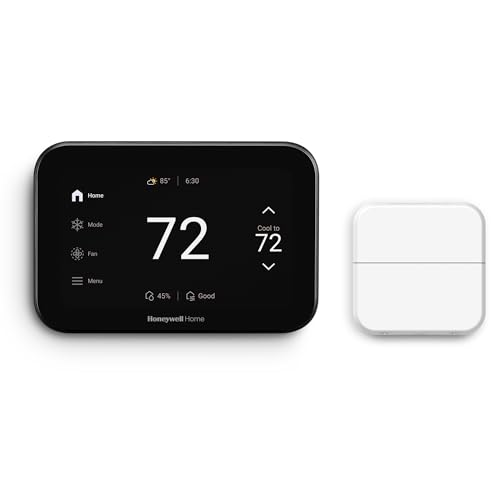
Honeywell Home
Traditional thermostat expertise with smart features. Wide model range for different needs. Good HVAC compatibility. Reliable performance. Some models support remote sensors.
Best Models: T9, T10 Pro
under $500 on Amazon
Emerson Sensi
Good budget option with smart features. Easy installation. Works without C-wire on many systems. Basic but reliable smart features. Good app control.
Best Models: Sensi Touch 2, Sensi Lite

under $250 on Amazon
Fair Pricing Guide
| Thermostat Type | New Price | Fair Used Price | Key Considerations |
|---|---|---|---|
| Budget Smart (Sensi Lite) | $80-100 | $35-55 | Low savings, consider new for warranty |
| Entry Smart (Nest Thermostat) | $130-150 | $65-90 | Good value, verify account reset |
| Mid-Range (Ecobee Enhanced) | $180-220 | $90-130 | Check included sensors, test connectivity |
| Premium (Nest Learning 3rd gen) | Under $500 | $120-170 | Excellent value used, test ring control |
| Premium (Ecobee Premium) | $250-300 | $130-180 | Verify sensors included, test Alexa |
| Pro Models (T10 Pro) | Under $250 | $100-150 | Often from pro installs, good condition |
Pricing Note: Prices drop significantly without included sensors or mounting hardware. Remote sensors alone cost $40-80 each. Factor C-wire adapter costs ($25-50) if your system needs one. Thermostats from professional HVAC removals are often in excellent condition—ask the source.