
Introduction
Action cameras capture life's adventures in stunning quality, from mountain biking and surfing to skydiving and everyday vlogging. Premium action cameras like the latest GoPro or DJI models can cost $400-$500 new, making the used market an excellent option for content creators and adventurers on a budget.
Recommended Products
Based on our research, here are some top picks:
GoPro HERO12 Black -

under $500 on Amazon
DJI Osmo Action 4 -

under $250 on Amazon
DJI Osmo Pocket 3 -
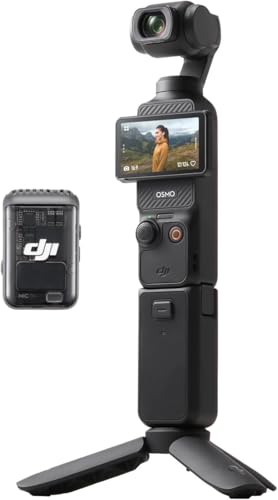
under $750 on Amazon
As an Amazon Associate, we earn from qualifying purchases.
However, action cameras lead hard lives. They're designed for extreme conditions but still accumulate damage from impacts, water exposure, and heavy use. A camera that looks fine externally might have compromised waterproofing, degraded image stabilization, or internal damage affecting video quality.
This guide covers testing for all major action camera brands including GoPro, DJI Action, Insta360, and others. Whether you're seeking a basic action cam for recreational use or a professional-grade 360° camera, thorough testing ensures you get a reliable tool for capturing your adventures.
Pro Tip: Bring an SD card with sufficient speed (V30 or higher for 4K) to test recording. Some action camera issues only manifest during actual recording, not during preview or playback.
Video Quality Assessment
Video quality is the primary purpose of any action camera. Testing video output at various settings reveals sensor health, processing quality, and potential issues that affect footage usability.
Resolution and Frame Rate Testing
Record test clips at the camera's maximum resolution (4K, 5.3K, or higher) and highest frame rates. Verify the camera can sustain recording without overheating or dropping frames. Check that recorded files play back at the correct resolution and frame rate. Some damaged cameras may claim high resolution but produce lower-quality output.
Dynamic Range Evaluation
Record scenes with both bright and dark areas (windows, shadows, sky). Quality action cameras should retain detail in highlights and shadows simultaneously. Check for blown-out highlights or crushed blacks. Compare performance to sample footage from the same model online. Poor dynamic range might indicate sensor degradation.
Low Light Performance
Test in dimmer conditions to evaluate noise levels and autofocus accuracy. Action cameras typically struggle in low light, but performance should match the model's known capabilities. Excessive noise, color banding, or focus hunting in moderate low light indicates potential issues. Some cameras have specific low-light modes worth testing.
Color Accuracy
Record familiar subjects and verify colors appear natural and accurate. Check skin tones, blue sky, and green foliage for realistic reproduction. Look for color casts or unusual saturation. Test different color profiles (Standard, Flat, GoPro Color) to verify all work correctly.
Photo Quality
Test photo modes including single shot, burst, and RAW if available. Verify images are sharp and properly exposed. Check for hot pixels that appear as bright dots in photos. Test HDR photo modes for proper alignment and processing.
Stabilization System Testing
Electronic or hybrid stabilization is a defining feature of modern action cameras. Degraded stabilization transforms potentially great footage into unwatchable, shaky video.
Walking Test
Record while walking at a normal pace. Modern stabilization should produce smooth, floating footage with minimal visible bounce. Compare to stabilization demos of the same camera model. Any visible jitter or sudden corrections indicate potential gyroscope or processing issues.
Running and High-Vibration Test
Record while running or in high-vibration scenarios if possible. This stresses the stabilization system and reveals limitations. Horizon lock features should maintain level footage. Check for stabilization artifacts like warping or jello effect during intense movement.
Stabilization Mode Verification
Test all stabilization modes (Standard, High, Boost, HyperSmooth, etc.). Each mode should show progressive improvement. Verify horizon leveling or 360° horizon lock functions correctly. Check that stabilization crops appropriately at each setting.
Gyroscope Calibration
Some stabilization issues stem from miscalibrated gyroscopes. Check camera settings for gyroscope calibration options. A properly calibrated camera should show no drift when stationary. If footage drifts or tilts during still shots, calibration or replacement may be needed.
Waterproofing Inspection
Many action cameras advertise waterproof ratings, but seals degrade over time and damage. Compromised waterproofing can destroy a camera instantly when submerged.
Understanding Waterproof Ratings
Most action cameras are rated for 10-33 feet (3-10 meters) without housing. These ratings assume new seals and proper door closure. Older cameras or those with visible damage may have compromised waterproofing. Never trust waterproofing on a used camera without careful inspection.
Door and Seal Inspection
Examine all doors, covers, and seals carefully. Battery doors, USB ports, and SD card covers should close firmly with positive engagement. Check rubber seals for cracks, compression damage, or debris. Verify seals sit properly in their grooves. Any visible seal damage significantly increases water intrusion risk.
Housing Assessment
Inspect the camera body for cracks, especially around lens and door areas. Check for warping that might prevent proper door sealing. Look for salt deposits or corrosion indicating previous water exposure. Examine mounting points for stress cracks that might compromise integrity.
Protective Housing Option
If waterproofing is critical for your use, consider purchasing with or buying a dive housing separately. Dive housings provide protection to much greater depths and remove reliance on camera seals. Verify housing compatibility with the specific camera model.
Warning: Never test waterproofing by submerging a used camera yourself. If you need water capability, use a protective housing or accept that built-in waterproofing may be compromised.
Battery Health Assessment
Action camera batteries degrade with use and age. Poor battery health limits recording time and may affect camera performance during demanding recording modes.
Battery Life Testing
Start with a fully charged battery and note the percentage or bar display. Record continuously at the highest quality setting. Monitor how quickly the battery depletes. Compare actual runtime to manufacturer specifications for that mode. Significant shortfall (more than 25-30% reduction) indicates degraded battery capacity.
Physical Battery Inspection
Remove the battery and inspect for swelling, which indicates dangerous cell failure. Check battery contacts for corrosion or damage. Verify the battery is genuine manufacturer equipment, not a third-party replacement. Aftermarket batteries often provide reduced capacity and may lack safety features.
Charging System Verification
Test charging with the included charger if available. Verify the camera recognizes the battery and charges properly. Check for accurate charge level reporting. Batteries that show full but don't hold charge have significant degradation.
Battery Replacement Consideration
Factor battery replacement cost into your evaluation. Official batteries for popular action cameras typically cost $20-$40. If multiple batteries are included, test each one. Having at least one good battery is essential for practical use.
Physical Condition Assessment
Action cameras withstand significant abuse, but accumulated damage affects functionality and indicates how the camera was used. Thorough physical inspection reveals issues that impact performance.
Body and Frame Inspection
Examine the camera body for cracks, dents, and deep scratches. Pay attention to corners and edges where impact damage commonly occurs. Check the lens cover for scratches, chips, or cracks that affect image quality. Verify all mounting points (fingers, threads) are intact and undamaged.
Button and Control Function
Test every physical button for proper function and tactile feedback. Buttons should click positively without sticking or requiring excessive force. Check that the touchscreen responds accurately across its entire surface. Test voice control if the camera supports it.
Screen Condition
Inspect front and rear screens for scratches, cracks, or dead pixels. Display a white image to check for uniformity issues. Verify screen brightness adjusts properly. Check touchscreen sensitivity, especially at edges. Screen protectors may hide damage underneath.
Port and Door Condition
Check USB-C/micro-USB ports for damage or debris. Verify battery and SD card doors open, close, and latch properly. Test that the SD card slot accepts and ejects cards correctly. Examine door hinges for wear or damage.
Sensor and Lens Evaluation
The sensor and lens directly determine image quality. Even minor issues can significantly impact footage, making careful inspection essential.
Lens Cover Inspection
Examine the lens cover under good lighting for scratches, chips, or internal coating damage. Small scratches may not affect image quality, but larger ones can cause flare or soft spots. Check for internal moisture or fogging indicating seal failure. Verify the lens cover is the original, not a replacement that might not match the optical quality.
Sensor Health Testing
Take photos and video of a uniformly lit surface (white wall or sky) to check for sensor issues. Look for hot pixels that appear as bright dots in the same position across multiple images. Check for dead pixels that appear as black dots. Minor hot pixels are common and often only visible at high ISO; clusters or numerous issues indicate problems.
Internal Contamination
Photograph a bright, uniform surface and examine at 100% zoom for dust spots. Internal dust behind the lens appears as fuzzy shadows. Small amounts are normal, but significant contamination affects image quality. On cameras with removable lens covers, check the internal elements.
Focus Consistency
Most action cameras have fixed focus. Test that the entire frame is sharp at typical shooting distances. Check for soft corners or inconsistent focus across the frame. Any variable focusing or hunting indicates potential lens or sensor issues.
Audio Quality Testing
Audio quality often separates usable footage from frustrating recordings. Action cameras face unique audio challenges from wind, water, and vibration.
Microphone Function
Record audio in a quiet environment and speak at various distances. Audio should be clear without excessive noise or distortion. Check for dead channels (stereo cameras) or significantly unbalanced levels. Damaged or clogged microphones produce muffled or distorted audio.
Wind Noise Performance
Record in breezy conditions to test wind noise reduction. Most action cameras include wind noise reduction settings—test these at various levels. While some wind noise is inevitable, excessive rumbling or complete audio unusability indicates poor microphone condition or settings.
External Audio Support
If the camera supports external microphones (via USB-C adapter or media mod), test this functionality if you plan to use it. Verify the camera properly switches to external audio when connected. Check that media mods or audio adapters are genuine and functioning.
Audio Sync Verification
Record yourself clapping and verify audio syncs with video. Audio drift is a serious issue that makes footage unusable. Play back recorded clips and check synchronization at the beginning and end of longer recordings.
Connectivity Testing
Modern action cameras rely on wireless connectivity for file transfer, live preview, and camera control. Testing these features ensures full functionality.
WiFi Connection
Connect the camera to your phone via WiFi using the companion app. Verify stable connection and reasonable file transfer speeds. Test live preview for smooth, low-latency video. WiFi issues can indicate internal component damage.
Bluetooth Functionality
Pair via Bluetooth and test camera control features. Verify the camera maintains connection at reasonable distances. Check that camera settings can be adjusted through the app. Bluetooth is typically more reliable than WiFi for basic control.
USB Data Transfer
Connect to a computer and verify the camera appears as a storage device. Test actual file transfer speeds—action camera files are large and slow transfers impact workflow. Verify USB-C cables seat properly and don't disconnect easily.
GPS Functionality
If the camera includes GPS, verify it acquires satellites and records location data. Check that GPS data embeds properly in files. GPS antenna issues may cause slow or failed satellite lock.
Brand-Specific Testing Tips
Each action camera brand has unique features, common issues, and testing considerations. Knowing your brand helps ensure thorough evaluation.
GoPro
GoPro cameras use the GoPro Quik app and GoPro cloud subscription. Verify the camera connects to the app and all features are accessible. Test HyperSmooth stabilization at various levels. Check for overheating during 4K60 or higher recording. Verify the lens cover isn't scratched (replaceable on newer models). Check that the door latch replacement hasn't been needed (common failure point).
DJI Action Cameras
DJI cameras use the DJI Mimo app and DJI account. Test RockSteady and HorizonSteady stabilization modes. Verify the magnetic quick-release mount functions properly. Check the front screen touch sensitivity on dual-screen models. Test DewPoint technology anti-fog feature if equipped.
Insta360 Cameras
Insta360 cameras offer 360° or action cam modes. Test FlowState stabilization effectiveness. For 360° cameras, verify both lenses function and produce matching exposure. Check stitching quality where lens views meet. Test the Insta360 app for editing and export functionality. Verify all special features like invisible selfie stick work properly.
Budget Action Cameras
Budget cameras from Akaso, Campark, and similar brands require careful testing. Advertised specifications may not match reality. Test actual resolution and stabilization quality against claims. Verify waterproofing ratings are accurate. Check for genuine accessories versus knockoffs.
Used Action Camera Pricing Guide
Action camera values vary based on model, condition, accessories, and generation. Use these guidelines for fair pricing.
| Camera Model | Excellent | Good | Fair |
|---|---|---|---|
| GoPro Hero 12/13 | $280-$350 | $220-$280 | $170-$220 |
| GoPro Hero 10/11 | $180-$250 | $140-$180 | $100-$140 |
| DJI Action 4/5 | $250-$320 | $200-$250 | $150-$200 |
| Insta360 Ace Pro | $280-$350 | $220-$280 | $170-$220 |
| Insta360 X3/X4 | $300-$400 | $240-$300 | $180-$240 |
| GoPro Hero 8/9 | $120-$170 | $90-$120 | $60-$90 |
| Budget Action Cams | $40-$70 | $25-$40 | $15-$25 |
Price-Affecting Factors
- Lens condition: Scratched lens reduces value 15-30%
- Battery health: Degraded batteries reduce value 10-15%
- Accessories included: Extra batteries, mounts add 10-20% value
- Waterproofing integrity: Compromised seals reduce value 20-40%
- Generation: Each generation back reduces value 20-30%
Shop Action Cameras
Compare prices on popular action cameras:
Complete Testing Checklist
Use this interactive checklist during your inspection to ensure thorough evaluation.
Red Flags - When to Walk Away
Some issues make a used action camera not worth purchasing. Watch for these warning signs.
Lens Damage
Deep scratches or cracks on lens cover
Failed Stabilization
Stabilization doesn't work or produces jittery video
Water Damage Signs
Internal moisture, corrosion, or damaged seals
Severe Battery Degradation
Battery lasts minutes instead of expected runtime
Recording Failures
Camera stops recording randomly or corrupts files
Sensor Problems
Clusters of dead pixels or major color issues
Overheating Issues
Camera shuts down quickly during normal recording
Audio Failure
Non-functional or severely distorted microphones
Final Recommendations
Used action cameras offer excellent value for content creators and adventurers. These cameras are built tough, and many used units have plenty of life left for capturing your adventures.
Focus testing on the critical elements: lens condition, stabilization performance, and waterproofing integrity. Cosmetic wear is expected and acceptable if core functionality remains solid.
Bring your own SD card and take time to record actual test footage. Review clips carefully on a larger screen if possible. The right used action camera will serve reliably for years of adventure documentation.